Golf Simulator Electrical Requirements by Maker (2026): Does It Need a Dedicated Circuit?
By Evan Reid, with research from the HPG Research Team · Updated Oct. 14, 2026
No current launch monitor or projector document we read asks for a dedicated circuit, so golf simulator electrical requirements are mostly about the outlet. For a simulator bay in the garage or basement, start the wiring plan there.
If you want a one-order bay, Bushnell's Launch Pro Simulator Bundle is $6,499.99 for the 8' or 10' enclosure as of October 3, 2026, plus the gaming PC it requires. Plan a wall outlet for its adapter: the box list includes a power strip, while Foresight's troubleshooting step says to plug the adapter straight into the wall.
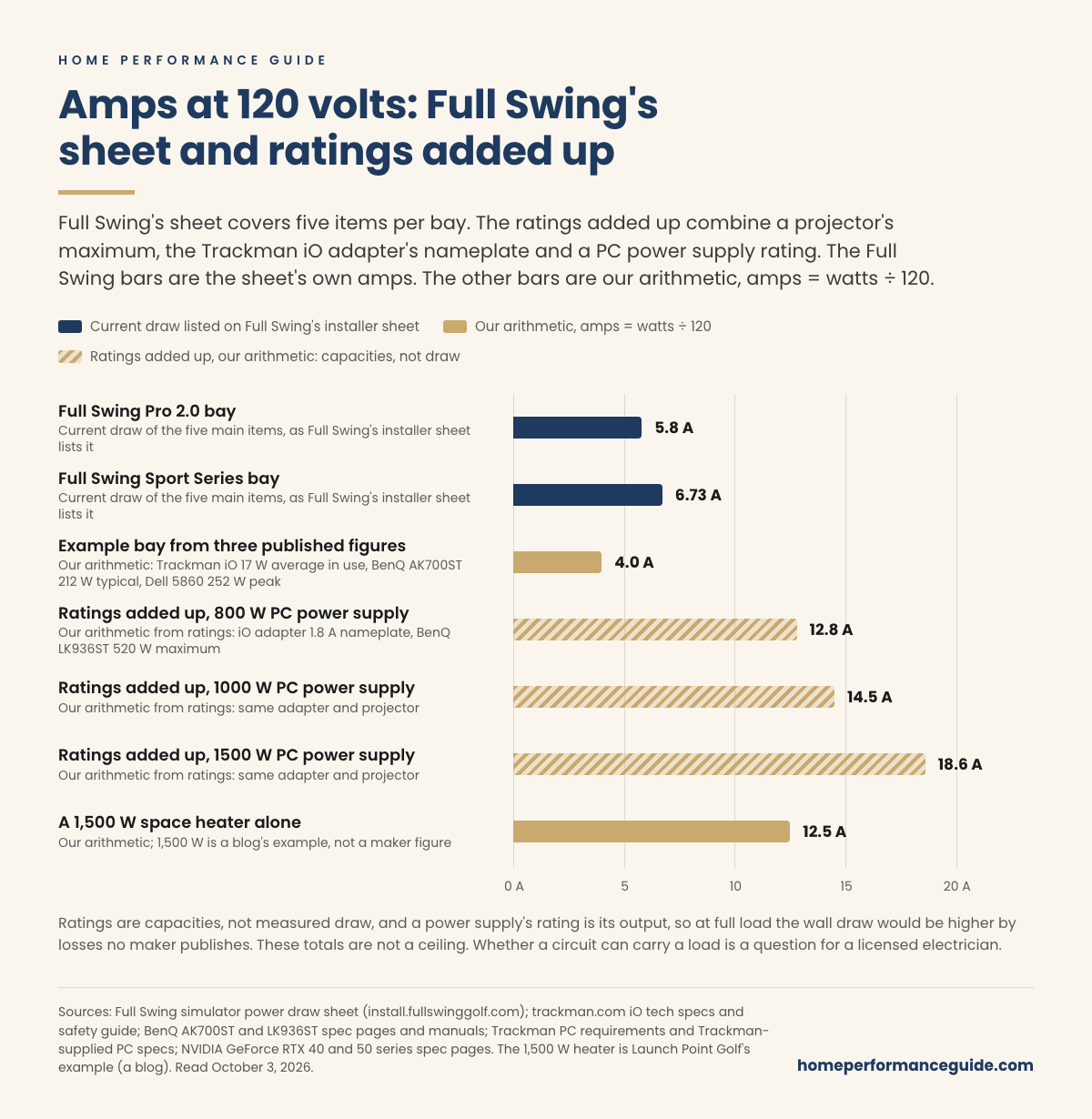
In a garage, count the heater. By our arithmetic, a 1,500 watt space heater draws 12.5 amps at 120 volts, more than the five main items in either Full Swing bay, whose projector figures are model-specific.
On October 3, 2026, we read what 10 launch monitor brands publish about power, plus BenQ's and Optoma's projector specs.
- Circuit: the one launch monitor or projector maker line we found that asks for a dedicated circuit is in Foresight's 2011 pre-installation checklist for an older installed simulator, and it says 15 amps. Trackman caps the iO's breaker at 20 amps, on our reading of its "must be max 20A" line.
- Load: Full Swing's installer sheet lists the five main items in two bays (touch screen, ION camera, hub, projector and PC) at 5.8 and 6.73 amps at 120 volts; other room loads, such as lighting and heat, are not included.
- Ceiling: Foresight's optional SIM IN A BOX installer drawings put a ceiling outlet beside a ceiling-mounted projector, and Uneekor's EYE XR still needs an outlet where its PoE injector sits.
- Installers: some ask for two dedicated 20 amp circuits, and none of the installer pages we read that do links to or quotes a maker document.
Below: first the outlet each unit needs, then the amps and the circuit, then the bundle or kit to order and the questions to send before you do.
What are the golf simulator electrical requirements for each maker?
Mostly, an outlet within reach of each unit's cord, grounded where the maker asks for it. Trackman, Uneekor, BenQ and Optoma print the grounding rule, and Foresight's Falcon is the only current unit we found that asks for GFCI protection.
Find your unit in the first column and read across to the outlet column; "Not published" means we found no line in the documents we read.
On a phone, swipe the table to see all four columns.
| Unit (mount) | Power rating, maker's words | Outlet, grounding, GFCI | Strips, surge, cords |
|---|---|---|---|
| Bushnell Launch Pro and Foresight GC3 (floor, battery) | Adapter input 100-240V, 50/60Hz, "1.0A MAX" | Foresight troubleshooting: "directly into a wall outlet" | Foresight troubleshooting step (edited March 12, 2026): "avoid surge protectors, power strips, or extension cords". Bushnell bundle pages (undated, read October 3, 2026) list a "Power Strip With Surge Protector" |
| Bushnell Launch Pro i (floor) | "AC Converter 15V, 2.5 amp" (output; Bushnell publishes no input) | "Plug the end of the Power Cord into an electric plug." | The same Foresight line names "Launch Pro Indoor" |
| Foresight GCQuad, QuadMAX (floor, battery) | Adapter input 100-240V, 50/60Hz, "1.0A MAX" | Foresight troubleshooting: "directly into a wall outlet" | The same Foresight line |
| Foresight Falcon (ceiling) | Not published ("Power Supply: Integrated") | "GFCI-protected outlet" | Quick Start allows a "GFCI-protected power strip"; 6 ft cord |
| Trackman iO (ceiling) | Adapter "1.8A"; "Avg. during use (17 W)" | Grounded; "near the equipment"; protection "max 20A" | "Use only the supplied cord only." |
| Trackman 4 (floor, battery) | Charger "65W" | With the setting enabled, cutting power at the outlet shuts it down | Cable "3,40m"; One Button strip, Europe only |
| Full Swing KIT (floor, battery) | "45W Max" | "Plug the charger into the wall."; the safety manual's symbol key says Class II devices are "not provided with a grounding-type plug (depending on power supply)" | Not published |
| Uneekor EYE XO, XO2 (ceiling) | 100 to 240V "outlet only" | "MUST BE GROUNDED"; green wire if not | Warranty excludes surges; 11 ft |
| Uneekor EYE XR (ceiling) | 100 to 240V; PoE injector | Injector plugs "into an outlet"; grounded | 11 ft power supply |
| Uneekor EYE MINI, MINI LITE (floor) | 100 to 240V | "MUST BE GROUNDED" | 9 ft and 8.5 ft |
| SkyTrak ST MAX, ST+ (floor, battery) | Not published | "Plug Power into USB C wall outlet." (ST MAX; the box lists a "WallCharger") | Warranty excludes "power changes" |
| Garmin Approach R10, R50 (floor, battery) | Not published; R50 standby "0.1 W" | R50: "Connect the power cable to a wall outlet." | Not published |
| FlightScope Mevo+, Mevo Gen2 (floor, battery) | DC side only: "5V DC +/- 5%; >2 A"; Gen2 "2A" | Not published | Not published |
| Rapsodo MLM2PRO (floor, battery) | None on the public pages we read; no wall adapter in the box | FAQ: "try a different charging adapter, cable and outlet combination" | Not published |
| Square Golf Home, OMNI (floor, battery) | Home: "DC 5V / 1A" (same page: "5V /2A" for the charge time); OMNI: "DC 20V / 3.0A" | Not published | Not published |
| BenQ golf projectors | 192 to 440W typical at 110V; LK936ST "520 W (Max)" | "must be earthed"; outlet "at an accessible height" | Surge protector or UPS only where mains "may fluctuate or cut out"; 1.8 m cord (AH500ST 3.0 m) |
| Optoma golf projectors | GT2000HDR: 140W typical @110VAC in the manual Optoma links (it names no model), 139W max on the product page. ZK521ST-B: "196 W @110VAC" | "must be properly grounded (earthed)" | GT2000HDR manual: "Use a power strip and or surge protector." ("and/or" in the ZK521ST-B manual) |
| Simulator PC (Trackman's spec) | Power supply "Min. 800W" (a rating) | Not published | Not published |
Foresight's discontinued GCHawk (August 10, 2026) asked for "a 3 conductor, GFCI protected outlet." Its replacement is the Falcon. If a GCHawk is still on your list, plan that outlet; for the Falcon, the GFCI line below applies.
Grounding: four makers require it
Trackman's iO safety guide says "This device must be grounded," and its installation guide says the outlet "must always include a Grounded connection." Uneekor's guides for the EYE XO, XO2, XR, MINI and MINI LITE say "THIS DEVICE MUST BE GROUNDED." BenQ's manuals say "This apparatus must be earthed," and the manual Optoma links from its GT2000HDR page says the unit "must be properly grounded (earthed)."
If your pick is one of theirs, have your electrician confirm that the outlet at its spot is grounded.
Full Swing's KIT safety manual describes the other kind of device in its symbol key: "Products marked with this symbol are Class II devices. These devices are not provided with a grounding-type plug (depending on power supply)." If the KIT is your pick, check its charger's plug with Full Swing before your electrician changes an outlet for grounding.
GFCI: Foresight's ceiling units only
The Falcon manual says to plug its power cord "into a GFCI-protected outlet." The Falcon Quick Start allows "a GFCI-protected outlet or GFCI-protected power strip" and notes that such outlets "are identifiable by the test and reset buttons."
We found no GFCI line for any floor unit, and none for a projector or PC. Whether the outlets in your room need GFCI protection anyway is a question for your electrician. If the Falcon is your pick, put a GFCI-protected outlet within reach of its 6 ft cord on your electrician's list.
What no launch monitor or projector maker asks for
No current launch monitor or projector maker document we read asks for 240 volts. Every BenQ and Optoma golf projector page we read lists 100 to 240 volts, and the highest maker maximum we found is 520 watts, for BenQ's LK936ST. A blog, golfsimulatoradvisor, says "240V may be needed for high-powered projectors." aboutGolf, which sells whole simulators, says it coordinates electricians "for dedicated circuits" and gives no numbers.
Before you pay for a 240 volt line, ask which maker document calls for it.
None of the maker documents we read requires surge protection: Optoma's manuals say to "Use a power strip and or surge protector" ("and/or" in the ZK521ST-B manual), and BenQ recommends one only where the mains voltage "may fluctuate or cut out." A surge protector for the projector is your call, then; for the Launch Pro's adapter, see the power-strip section below.
The makers' documents point to "local codes" and name no section of the electrical code. Book the outlet work accordingly: Foresight's Falcon manual names "licensed contractors" and Trackman names "a qualified electrician."
Checkpoint: the outlet at each spot. A floor unit on an adapter needs a wall outlet within reach of its cord, which keeps Bushnell's Launch Pro and Launch Pro i bundles on your list. A ceiling unit, such as the Trackman iO, a Uneekor EYE XO or Foresight's Falcon, needs an outlet within reach of its cord before anything else. For a launch monitor bought on its own, a Carl's Place enclosure kit is one route once its outlet is planned.
How many amps does a golf simulator use?
On Full Swing's installer sheet, the five main items in each of its two bays draw under 7 amps: 5.8 and 6.73 amps at 120 volts, not counting other room loads. Add up ratings for an iO adapter, a projector and a PC power supply, and you get 12.8 to 18.6 amps by our arithmetic. These totals aren't an upper limit.
What this means for you: your electrician needs the whole room, the gear plus whatever shares the circuit. In the gear, pin down the PC: the power supply ratings quoted here run from 750W (Full Swing's Dell 5860, Gen2) to 1500W (the Trackman-supplied Dell), and Trackman's minimum is 800W.
The two bays are Full Swing's Pro 2.0 (690 watts) and Sport Series (807.6 watts); we read the installer sheet on October 3, 2026. Full Swing's sheet lists these figures as current draw and states no circuit requirement. Its projector figures are for the specific models it lists, and it notes that "Current draw can vary between models." A PC power supply's rating is its output, so at full load the wall draw would be higher by losses no maker publishes.
Read the Kind column before the amps: a rating is a capacity, not a measured draw, and the two adapter rows show the printed nameplate maximum instead of our arithmetic at 120 volts.
On a phone, swipe the table to see all four columns.
| Part | Maker's figure | Kind | Amps at 120 V (ours) |
|---|---|---|---|
| Trackman iO, in use | "Avg. during use (17 W)" | Average in use (Trackman's figure) | 0.14 |
| Trackman iO adapter | "1.8A" input | Nameplate rating | 1.8 (nameplate) |
| Launch Pro / GC3 adapter | "1.0A MAX" input | Nameplate rating | 1.0 (nameplate) |
| BenQ AK700ST projector | "212W" typical; "320 W (Max)" | Typical; maximum | 1.77; 2.67 |
| BenQ LK936ST projector | "440W" typical; "520 W (Max)" | Typical; maximum | 3.67; 4.33 |
| Optoma ZK521ST-B projector | "196 W @110VAC" | Bright mode; ±15% per the manual Optoma links (it names no model) | 1.63 |
| RTX 4070 Ti graphics card | 226 W average gaming | Card only (NVIDIA's figure) | 1.88 |
| PC power supply, Trackman minimum | "Min. 800W" | Rating | 6.67 |
| PC power supply for an RTX 5090 | 1000 W "Required System Power" | Minimum power supply size (NVIDIA) | 8.33 |
| PC power supply, Trackman-supplied Dell | "1500W" | Rating | 12.5 |
| Dell 5860 sim PC (Full Swing's sheet) | "252" W | Peak load (Full Swing's words) | 2.1 |
Launch monitors
Trackman lists the iO at 17 watts average in use. Its adapter's "24Vdc, 5.0A" output works out to 120 watts by our arithmetic, which is the adapter's capacity. Foresight rates the Launch Pro, GC3, GCQuad and QuadMAX adapters at "1.0A MAX" input, and the Trackman 4 charger is "65W." Full Swing's sheet lists its ION camera at 96 watts, while a blog, golfsimulatoradvisor, says launch monitors "usually" use "10-50 watts" and that "some high-end models may consume more."
In the figures we found, the projector and the PC set most of the load.
Projectors
BenQ lists its golf projectors at 192 to 440 watts typical at 110 volts. It gives the LK936ST two maximums, "520 W (Max)" in the manual and "Max 495W" on BenQ Indonesia's spec sheet; plan around 520, the higher one. The manual Optoma links for the GT2000HDR, which names no model, gives 140 watts typical, and Optoma's product page lists 139W max; plan around 140.
The PC: power supply ratings vs the draw Full Swing lists
None of the PC requirement pages we read from Trackman, Uneekor, SkyTrak or GSPro gives a wall draw. Trackman gives a power supply minimum, "Min. 800W," and GSPro says to "calculate the required power your PSU needs."
NVIDIA's "Required System Power" is a minimum power supply size: 850 watts for the RTX 5080 and 1000 for the RTX 5090, both in Trackman's 4K column, so NVIDIA asks more than Trackman's 800 for those cards. Its footnote reads: "Minimum is based on a PC configured with a Ryzen 9 9950X processor. Recommend PCIe CEM 5.1 compliant PSU. Power requirements can be different depending on system configuration."
Full Swing's installer sheet gives one wall draw, for its Dell 5860: 252 watts, noted as "peak load," and "The 5860 PC draws 0.00A when off, and 1.36A when on, but idle." The sheet lists that PC's power supply as "Gen1: 1350W, Gen2: 750W," about 3 to 5.4 times the peak, by our arithmetic. Our packages guide shows which golf simulator packages include a PC.
The Bushnell bundle requires a gaming PC and doesn't include one, so the PC's power supply rating goes on the electrician's list.
A bay, added up
Take an example bay built from three published figures: Trackman iO 17 W, BenQ AK700ST 212 W typical and Full Swing's Dell 5860 252 W peak. By our arithmetic, it comes to 481 watts, about 4.0 amps at 120 volts. Trackman's iO PC spec lists an RTX 4070 Ti or 4070 Ti Super (or a 5070 Ti), and NVIDIA lists either 40-series card at 226 watts average gaming on its own. It's one example; the next paragraph builds the high end from ratings.
Built from ratings, the iO adapter's 1.8 amp nameplate, the LK936ST's 520 watt maximum and a PC power supply of 800, 1,000 or 1,500 watts come to 12.8, 14.5 and 18.6 amps by our arithmetic. The blog golfsimulatoradvisor says "A typical simulator with a projector, computer, and launch monitor might consume around 1,000 to 1,500 watts."
The short version: plan the circuit with your electrician around the room total from published ratings, and treat the example bay's 4.0 amps as the low end of the figures here.
How much electricity does a golf simulator use, and what does it cost to run?
About 9 cents an hour for the example bay above, at the U.S. average residential price of 18.31 cents per kWh for July 2026, by our arithmetic. Two hours a day comes to about $61 a year at 2025's average of 17.30 cents.
Both prices are EIA's, and EIA marks them as preliminary estimates. The five main items in Full Swing's Sport Series bay, 807.6 watts, come to about 15 cents an hour by our arithmetic, or about $102 a year at two hours a day and 17.30 cents. At these figures, running cost is a small line in the budget, and the room and its outlets decide the purchase.
Idle draw varies. Trackman lists the iO at 7 watts idle and says it sleeps "whenever TPS is not in use." Full Swing's note puts the Dell 5860 at 1.36 amps when on but idle, about 163 watts by our arithmetic, and at 0.00A when off, so shut the PC down between sessions. Your own rate and hours change every figure here.

Does a golf simulator need a dedicated circuit?
No current launch monitor or projector maker document we read asks for one. The only one we found is Foresight's 2011 checklist for an older installed simulator, which says a dedicated 15 amp circuit "must be within 6 (six) feet" of the simulator computer. The page before it asks for two 15 amp outlets and only recommends that distance.
What this means for you: a dedicated circuit is a decision you make with your electrician for the whole room, heater and lights included. No current maker document we read makes it for you.
The one maker document we found that asks for one (2011)
Foresight's pre-installation guide, version 1.0_042011, was written for the "Foresight Sports Performance Simulator." Its computer page says "The COMPUTER area requires two 110v x 15amp outlets for power" and recommends them "within 6 FEET of the computer." The checklist that follows reads: "Client understands that a dedicated 110volt x 15amp x 2 outlet power circuit must be within 6 (six) feet of the proposed placement of the simulator computer." The guide isn't linked from Foresight's current SIM IN A BOX support page, though it still loads by direct URL.
If an installer cites this guide, ask which current document applies to your gear.
What installers say, and what they cite
Some installers ask for one or two dedicated 20 amp circuits. None of the installer pages we read that call for two dedicated 20 amp circuits links to or quotes a maker document. Treasure Valley Solutions says a simulator needs "at least two dedicated 20-amp circuits," and the words "two dedicated 20-amp circuits" link to a page about electrician apprenticeships. Launch House says "Minimum two dedicated 20A/120V circuits." GreenPro calls a dedicated 20 amp circuit for core simulator equipment "a strong starting point" for many residential rooms.
The blog golfsimulatoradvisor lists "Dedicated Circuit" among the "key electrical requirements" in its summary box, and its FAQ says "While not always necessary, a dedicated circuit for your golf simulator is highly recommended." Before you pay for two new circuits, ask which maker document calls for them. Your room may still need them once a heater and lights are counted.
The FCC sentence that reads like a circuit rule
Trackman's iO safety guide prints the same sentence as Foresight's Falcon manual: "Connect the equipment into an outlet on a circuit different from that to which the receiver is connected." FlightScope's Mevo+ manual has it too. Our reading: it is the standard FCC remedy for radio and TV interference, and it says nothing about load, so on its own it's no reason to pay for a separate circuit.
What to bring to an electrician
A licensed electrician sizes the circuit for the whole room, including whatever else is on it. Hand over this list:
- Each unit's published rating from the maker table near the top: the launch monitor's adapter, the projector's watts and the PC's power supply.
- The outlet lines: grounded for Trackman, Uneekor, BenQ and Optoma, GFCI-protected for Foresight's Falcon, and Trackman's "max 20A" protection line for the iO.
- Where each outlet will go: near each floor unit, at the PC cart's wall, beside a ceiling-mounted projector (Foresight's optional drawings), near the iO (Trackman), and wherever an EYE XR's PoE injector sits.
- Everything else that will run in the room, such as lighting, a garage door opener and a space heater, with the heater's nameplate.
The three questions in our sauna electrical guide apply here too, starting with whether the house has spare capacity.
What are the Trackman iO power requirements?
Trackman's iO guide asks for an easily accessible grounded outlet near the unit, and says "For Pluggable Equipment Type A, the protection in the installation must be max 20A" in the US and Canada. Our reading: that caps the breaker at 20 amps and doesn't ask for a 20 amp or dedicated circuit. The iO averages 17 watts in use, so the plan is that one outlet, on a breaker of 20 amps or less.
What "max 20A" says, and what it doesn't
The full sentence in the US and Canada guide (IN-0024 Rev 02.00) is: "For Pluggable Equipment Type A, the protection in the installation must be max 20A (USA, Canada, Japan), max 13A (UK, EU)." Trackman doesn't define "Pluggable Equipment Type A," so our reading, a 20 amp maximum for the breaker or fuse protecting that outlet, stays labeled as ours until Trackman says otherwise in writing.
Ask Trackman what the term means for a US install before your electrician sizes the breaker.
Where the outlet and adapter go
The guide says the outlet "shall be installed near the equipment, shall be easily accessible and must always include a Grounded connection," and to "Place the adapter on the shelf of the Trackman iO." Our reading: the adapter rides on the unit at the ceiling, so the mains cord has to run from there to the outlet.
The safety guide says "Use only the supplied cord only." If it won't fit the outlet, Trackman says to have "a proper socket outlet installed by a qualified electrician." We found no cord length, so ask Trackman for it before the outlet goes in.
Trackman 4: the charger and the shutdown setting
The Trackman 4 runs on a battery and charges from a "65W" charger with a "3,40m fixed cable length," about 11 feet by our conversion. Trackman says "When enabled, turning off or unplugging the outlet connected to the charging cable will safely shut down the Trackman." Its One Button power strip setup is "only possible in Europe," so outside Europe, plan the charger on a wall outlet within reach of that 11 foot cable.
What power supply does the Uneekor EYE XO need?
The EYE XO and XO2 plug into a 100 to 240 volt outlet through their own power adapter and connector, on an 11 ft cable, so plan an outlet within reach of it. Their manuals say "THIS DEVICE MUST BE GROUNDED" and provide a green ground wire "in case your outlet is not grounded." The PoE line in their spec tables looks copied from the EYE XR.
EYE XO and XO2: an AC adapter, despite the spec table
The box holds a "POWER CABLE, POWER ADAPTER AND CONNECTOR," and setup ends with "Then connect the Power Adapter to the power source/outlet." The spec tables in both product guides list PoE power under a garbled IEEE number; the IEEE PoE amendment with that suffix is 802.3bt. They carry the XR's size data too, so we treat every value in those tables as unreliable. Go by the box list and the setup steps.
"MUST BE GROUNDED", with a workaround offered
After the grounding warning, the setup page adds: "An extra green grounding wire is provided at the end of the power connector in case your outlet is not grounded. We recommend that you ground your unit, using this wire." Uneekor gives no length or attachment point for the wire, so ask Uneekor or your electrician before using it.
EYE XR: the outlet moves to the PoE injector
Uneekor's blog says PoE "means a single cable handles both data and power," and Shop Indoor Golf, a retailer, says "No need for a power outlet on your ceiling." The EYE XR still needs an outlet, where its PoE injector plugs in: its manual says to "plug the Power cable into an outlet."
If the XR is your pick, plan the outlet where the injector will sit, and the LAN run from there to the unit.
EYE MINI, MINI LITE and QED
Uneekor lists a "9ft Power Cable" for the EYE MINI and an "8.5ft Power Cable & Adapter" for the MINI LITE. The QED reaches end of life on December 31, 2026. If a QED is on your list, ask Uneekor what that date means for support before you buy.
Can the Bushnell Launch Pro power supply go into a power strip?
Plan on a wall outlet for the adapter. Foresight's help center, which covers the Launch Pro, says in a won't-power-on step edited March 12, 2026: "Plug the power adapter directly into a wall outlet" and "avoid surge protectors, power strips, or extension cords."
For the room the Launch Pro needs, see our Launch Pro and GC3 space requirements guide; for what the bundle includes, see our golf simulator packages guide.
What the Launch Pro's adapter is rated for
Foresight's power supply article for the GC3 and Launch Pro (July 15, 2024) lists an input of 100-240V, 50/60Hz and "1.0A MAX" and an output of 15.0V and 2.5A. It warns that the wrong supply may damage the device, "voiding the warranty."
For a replacement, Foresight's Launch Pro Specifications article (edited March 16, 2026) points buyers to Bushnell's "Replacement Power Cord for Launch Pro." That part was $64.99 as of October 3, 2026, and its page shows no volt, amp or watt rating; the 2024 article recommends Foresight's own online store. Before you buy a replacement, get its rating in writing: Foresight ties the warranty to the right supply.
Foresight: plug the adapter straight into the wall
Foresight's "Device Won't Turn On? Try These Steps" article (edited March 12, 2026) has a "Verify Power Source" step for the GC3, GC3s, Launch Pro, Launch Pro Indoor, GCQuad and QuadMAX. It asks for an adapter output of 15 volts and 2.4 to 2.6 amps, then gives the wall-outlet line quoted above. Foresight doesn't present that line as a setup rule.
Bushnell's bundle pages list a power strip
Both Bushnell bundle pages, which show no date, list a "Power Strip With Surge Protector" in the box, and neither says what should plug into it. Bushnell's simulator bundles page lists "9 components" with no strip. Beyond the LPi manual's "Plug the end of the Power Cord into an electric plug," we found no outlet guidance on Bushnell's pages or PDFs for the Launch Pro, the LPi or the bundles.
Foresight's own Ace kit ships a strip too
Foresight's SIM IN A BOX Ace manual says "Plug the Extension Cord into the Power Strip included in the Sim-In-A-Box." The Ace powers a Falcon, an overhead unit with an integrated supply, so its strip and the wall-outlet step are about different devices.
Confirm before you order: ask Bushnell in writing what should plug into the strip, and whether it ships with the bundle. Until it answers, the wall outlet is the plan, since it's the stricter reading of the two documents.
Check the Launch Pro Simulator Bundle at Bushnell Golf
Does the Launch Pro i have a battery?
Foresight's troubleshooting article (edited March 12, 2026) says the "GC3, GC3s, Launch Pro, and Launch Pro Indoor" contain "a built-in, non-removable battery." Bushnell's Launch Pro i manual (Rev. 11-25) never uses the word "battery," yet says "To charge your Launch Pro i, only use the factory-supplied power adapter." Resellers say it has none; Rain or Shine, for one, says "the LPi has no rechargeable battery." The documents don't settle it, and the answer decides whether the LPi needs an outlet at the hitting area, so ask Bushnell in writing.
Until it answers, plan an outlet at the hitting area for the LPi. If Bushnell won't confirm, the Launch Pro avoids the question, since Foresight's battery line above names it.
Golf simulator wiring diagram: where do the outlets go?
Few makers say where the outlet goes, and several publish only a cord length. Foresight's optional SIM IN A BOX drawings come closest, with a 120 volt ceiling outlet beside the projector mount and a wall outlet for the PC cart. The Falcon's 6 ft cord goes to a GFCI-protected outlet, and Trackman wants the iO's outlet near the unit.
The outlet lines in the table below are what your electrician needs to place each outlet. Our guide to how much room each launch monitor needs covers the distances around the hitting area.
Find each piece of your setup in the first column, then mark its outlet spot and cord length on your floor plan and hand it to your electrician.
On a phone, swipe the table to see all three columns.
| Maker or unit | Where the outlet goes, maker's words | Cord the maker publishes |
|---|---|---|
| Foresight, 2011 (older installed simulator) | Projector: "recommended within 3 FEET" of the mount. PC: "two 110v x 15amp outlets", "recommended within 6 FEET" | Not published |
| Foresight SIM IN A BOX drawings (2025; optional installer drawings, ceiling-mounted projector) | "120vac ceiling outlet (for PROJECTOR)", about 7 to 9 in from the mount (ours); "120vac wall outlet (for PC on cart)" | Not published |
| Foresight Falcon (ceiling) | Cord runs "to the overhead location" and into "a GFCI-protected outlet" | 6 ft |
| Trackman iO (ceiling) | "near the equipment", "easily accessible"; adapter on the iO's shelf | Not published |
| Trackman 4 (floor) | Not published; unit 6 to 9.5 ft behind the ball | Charger cable 3.40 m |
| Full Swing KIT (floor) | Not published; KIT 10 ft behind the ball (KIT user guide, retailer-hosted copy) | USB-C charging cable, 1 m |
| Uneekor EYE XO, XO2 (ceiling) | Not published | 11 ft with adapter and connector |
| Uneekor EYE XR (ceiling) | Wherever the PoE adapter plugs "into an outlet" | 11 ft power supply; LAN cable labeled "45ft/15m" (15 m is about 49 ft, our conversion) |
| Uneekor EYE MINI, MINI LITE (floor) | Not published | 9 ft; 8.5 ft |
| BenQ golf projectors | Outlet "at an accessible height" | 1.8 m (AH500ST 3.0 m) |
| Optoma golf projectors | Not published | Not published |
One retailer, Shop Indoor Golf, calls for "outlets positioned within 10 feet of equipment locations." No maker we read gives a 10 foot outlet distance; Foresight's 2011 guide recommends 3 feet for the projector and 6 feet for the computer.
Foresight's 2011 distances, written for its older simulator, both fall inside the retailer's 10.
Ceiling outlets for the projector and overhead units
Foresight's drawings, filed as "Installer Reference Files (Optional)," put the "120vac ceiling outlet (for PROJECTOR)" about 7 and 9 inches from the mount in plan, by our arithmetic from their dimensions. BenQ asks for an outlet at an accessible height so the projector can be shut down easily; Foresight's drawings put it on the ceiling beside the mount (our reading of the two together).
If your projector hangs from the ceiling, show your electrician both of those lines before the outlet goes in.
Extension cords across the ceiling
GreenPro, an installer, says that if the projector is ceiling-mounted, "install power at the projector location rather than running an extension cord across the ceiling." Foresight's Ace manual runs the power cable and an extension cord along the frame.
On the 12 ft wide Falcon plan, the "CAT6 Data & Power Run" crosses the top of the frame, then runs down the side and across the floor to the PC-cart wall outlet. The run across the top is drawn at 72 inches, the full length of the Falcon's 6 ft cord, and the drawing doesn't say which cord is used. If the Falcon is your pick, ask Foresight which cord makes that run before the outlet goes in.
Data cables: Uneekor's 45 ft label and a 60 ft listing
Uneekor wants its CAT6 cable "connected directly, without any adapters," yet its EYE XO, XO2 and XR boxes include a "USB-A Ethernet Adapter." It labels the LAN cable "45ft/15m," and 15 meters is about 49 feet by our conversion.
Carl's Place lists the EYE XO with a "USB ethernet adapter with 60-foot LAN cable." Those two lengths don't match: Uneekor's box list says 45 feet and Carl's Place's listing says 60.
Plan the cable path to 45 feet, the shortest figure, and it works whichever cable arrives. If you buy the EYE XO at Carl's Place, ask which cable ships. The free Golf Simulator Room Planner has a checklist item for this, "Outlets and cable path."
Can a golf simulator share a circuit with a garage heater?
No launch monitor maker we read addresses sharing a circuit with a heater. By our arithmetic, a 1,500 watt space heater alone is 12.5 amps at 120 volts, more than the five main items in either Full Swing bay, whose projector figures are model-specific. Next to the Launch Pro adapter's "1.0A MAX" rating, the heater is the big load: put its nameplate on your electrician's list. Have a licensed electrician check what else is on that circuit and whether the heater needs its own.
The only Foresight heater line we found is about placement: "Make sure the setup is far from gas lines, electric heaters, fireplaces, candles, or any other source of heat or fire hazard." GreenPro, an installer, says: "Avoid plugging high-value simulator equipment into a circuit that also serves a garage door opener, workshop tools, refrigerator, treadmill, or space heater." Launch Point Golf, a blog, supplies the 1,500 watt example: "A 4K projector, gaming PC, launch monitor, and 1500W heater on one circuit will trip the moment all four spin up."
Say your garage bay runs the example setup from the amps section with that heater on the same circuit. By our arithmetic, that's 1,981 watts, about 16.5 amps. The five main items in Full Swing's Pro 2.0 bay plus the heater come to 2,190 watts, about 18.3 amps.
In a garage that needs winter heat, count the heater in the circuit plan. Garage outlets come with their own code questions, which our guide to putting a sauna in a garage walks through.
Which golf simulator bundle or enclosure kit to get
With the outlets planned, two routes run through the links on this page: one Bushnell order for the launch monitor and enclosure, or a Carl's Place enclosure around a launch monitor you buy separately. Our packages guide covers the others. For the rest of the room beyond power, see our guide to what you need for a golf simulator at home.
Say it's a February night with snow piled against the garage door. The heater runs on the circuit your electrician sized for it, and the PC cart plugs into the wall outlet you planned. The projector puts a fairway on the screen. You roll a ball onto the mat and hit a wedge.
- You want the launch monitor and enclosure in one order: the Launch Pro Simulator Bundle, $6,499.99 for the 8' or 10' enclosure as of October 3, 2026. See the Launch Pro bundle at Bushnell Golf
- You want the lower bundle price and it's back in stock: the Launch Pro i Simulator Bundle, $5,499.99 and sold out when we checked on October 3, 2026. See Bushnell's golf simulator bundles
- Your launch monitor comes separately: one of the three Carl's Place enclosure kits below.
- No outlet reaches the hitting area: the Launch Pro bundle, since Foresight lists the Launch Pro with a built-in battery. Skip the Launch Pro i until Bushnell confirms one.
Launch Pro Simulator Bundle: a one-order bay on a wall outlet
One order brings the launch monitor and the enclosure together: Bushnell's bundle pairs the Launch Pro with an 8' or 10' enclosure, at $6,499.99 as of October 3, 2026. Foresight lists the Launch Pro with a built-in battery and rates its adapter at "1.0A MAX" input, so the gaming PC and the projector set the bay's load.
- Best for: an 8' or 10' enclosure bay where the launch monitor sits on the floor and its adapter can plug straight into a wall outlet.
- Skip it if: you don't want to source a PC, since Bushnell says a gaming PC is required and not included.
- Main compromise: its box list includes a power strip with no word on what plugs into it, while Foresight's troubleshooting step says to "avoid surge protectors, power strips, or extension cords" for the adapter.
The wall outlet settles it for ordering, and the strip question goes on your Bushnell list under Before you order.
Check today's Launch Pro bundle price at Bushnell Golf
Launch Pro i Simulator Bundle: the lower price, if it's back in stock
The Launch Pro i bundle was $5,499.99 and sold out when we checked on October 3, 2026, $1,000 less than the Launch Pro bundle by our arithmetic. Bushnell's simulator collection shows whether it's back.
- Best for: a bay with an outlet close to the hitting area.
- Skip it if: your hitting area has no outlet within reach and Bushnell hasn't confirmed a battery.
- Main compromise: Bushnell's own documents don't say whether it has a battery, and it was sold out on October 3, 2026.
What to plan until Bushnell answers on the battery is in the Launch Pro i section above, and the question is under Before you order.
See Bushnell's golf simulator bundles
Carl's Place enclosure kits: a bay built around a separate launch monitor
For a bay built around a launch monitor you buy on its own, Carl's Place sells the enclosure in three kits. The launch monitor's outlet line in the maker table is yours to settle first. To pick that launch monitor for a small room, our guide to the best launch monitor for a small space pairs a Carl's Place DIY kit with any floor unit that fits.
- Best for: a bay built around a launch monitor you already own or are buying separately, with its outlet planned.
- Skip it if: you want the launch monitor and enclosure in one order; Bushnell's Launch Pro Simulator Bundle is $6,499.99 for that as of October 3, 2026.
- Main compromise: the launch monitor is a separate purchase, so its grounding, GFCI and cord lines are a second plan to make.
If an EYE XO comes from Carl's Place too, its 60-foot cable listing doesn't match Uneekor's 45 ft label; the data-cable section above has the length to plan around.
Size the enclosure to your room first with our guide to how much room each launch monitor needs, then compare the three kits. If your ceiling is 9 feet, our guide to golf simulators for a 9 foot ceiling shows which kit sizes fit under it.
See the kits at Carl's Place: the DIY Golf Enclosure Kit, the Pro Golf Enclosure Kit and the Curved Golf Enclosure Kit.
Before you order
- Choose floor or ceiling for your launch monitor, and read its outlet line in the maker table near the top.
- Mark every spot that needs power: near the floor unit, the PC cart's wall, beside a ceiling-mounted projector, and, for an overhead unit, the spot its maker names (near the iO, or wherever an EYE XR's injector sits). Then photograph your electrical panel.
- Hand your electrician the list under "What to bring to an electrician," with your heater's nameplate if one will run in the room.
- Plan the cable path from the PC to each unit: Uneekor's LAN cable label says 45 ft, and the Falcon's cord is 6 ft.
- Send the questions for the gear you're buying in writing, and keep the answers with your order. For the Launch Pro bundle, that's Bushnell's 1 and 2; add 3 for the Launch Pro i. The rest apply only when that maker's gear is in your bay.
- Bushnell: What should plug into the bundle's "Power Strip With Surge Protector," given Foresight's step to plug the Launch Pro's adapter "directly into a wall outlet"?
- Bushnell: Does that strip ship with the bundle, since the simulator bundles page lists "9 components" with no strip?
- Bushnell: Does the Launch Pro i have a battery, or does it need an outlet at the hitting area?
- Trackman: What does "Pluggable Equipment Type A" mean for a US iO install, and what breaker size applies?
- Trackman: How long is the iO's supplied cord?
- Uneekor: Should the EYE XO's CAT6 cable use the "USB-A Ethernet Adapter" in the box, or connect directly?
- Uneekor: Where and how does the EYE XO's green grounding wire attach?
- Carl's Place: Is the LAN cable with the EYE XO 60 feet, as the listing says, or Uneekor's 45?
- Foresight: Which cord makes the 72 inch run across the top of the 12 ft Falcon plan?
- Optoma: Does the GT2000HDR draw the manual's 140W typical or the product page's 139W max?
- For the one-order bay, plan a wall outlet for the adapter, and the bundle is ready to order; Bushnell's answers settle the strip. See the Launch Pro bundle at Bushnell Golf
- For the Launch Pro i, check stock first: See Bushnell's golf simulator bundles
- For a separate launch monitor, choose the Carl's Place kit above once its outlets are on the electrician's plan.
Common questions
How much power does a golf simulator need?
Full Swing's installer sheet lists the five main items in two bays (touch screen, ION camera, hub, projector and PC) at 5.8 and 6.73 amps at 120 volts (690 and 807.6 watts), with the projector figures for the specific models the sheet lists; Full Swing notes that "Current draw can vary between models." Other room loads, such as lighting and heat, are not included. Ratings for one example bay (the Trackman iO adapter's 1.8 amp nameplate, BenQ's LK936ST 520 watt maximum and an 800, 1,000 or 1,500 watt PC power supply) add up to 1,536 to 2,236 watts by our arithmetic. Ratings are capacities, not measured draw. A PC power supply's rating is its output, so at full load the wall draw would be higher by losses no maker publishes; these totals are not a ceiling.
How much does it cost to use a golf simulator?
About 9 cents an hour for an example bay built from three published figures (Trackman iO 17 W, BenQ AK700ST 212 W typical, Full Swing's Dell 5860 252 W peak) at EIA's preliminary July 2026 U.S. residential average of 18.31 cents per kWh, by our arithmetic, or about $61 a year at two hours a day at the 2025 U.S. residential average of 17.30 cents. The five main items in Full Swing's Sport Series bay come to about $102 a year on the same basis, with other room loads, such as lighting and heat, not included. Your own rate and hours change the answer.
Can a golf simulator run on a 15 amp circuit?
Foresight's 2011 checklist for its older installed simulator asked for a dedicated 15 amp circuit, and Trackman's iO guide caps the circuit protection at 20 amps (our reading). Full Swing's sheet puts the five main items in each of its two bays under 7 amps. A 1,500 watt heater alone is 12.5 amps at 120 volts by our arithmetic. Whether a given circuit can carry your equipment, and what else is on it, is a question for a licensed electrician.
Do you need an outlet in the ceiling for a golf simulator?
Foresight's optional SIM IN A BOX installer drawings, for a ceiling-mounted projector, put a ceiling outlet beside the mount; its standard setup puts the projector on the included cart. Trackman's iO guide wants the outlet near the unit, and the Falcon ships with a 6 ft cord. Uneekor publishes no outlet location for the EYE XO. Its EYE XR needs one wherever the PoE injector sits, and BenQ asks for an outlet "at an accessible height."
What electrical service does a golf simulator need?
None of the current documents we read from the launch monitor and projector makers gives a service size or a circuit count. ForeFront, an installer, answers its own version of this question with "An electrician should calculate the actual load." Bring the electrician each unit's published rating and the figures Full Swing's sheet lists for the five main items in its two bays.
Can you put a golf simulator in your garage?
Room size decides most of it, and our golf simulator room guide lists each maker's minimums. On the electrical side, GreenPro, an installer, says to keep high-value simulator equipment off a circuit that also serves "a garage door opener, workshop tools, refrigerator, treadmill, or space heater." The code questions that come with garage outlets are covered in our guide to putting a sauna in a garage.
Your next step
Tonight, photograph your electrical panel and mark each spot that will need power. Then have each golfer who'll use the room take a slow full swing where the ball will sit, and check that every swing clears. Open the planner next: its twelve measurements include where each piece of gear will plug in and how the cables reach it without crossing the hitting area, plus a table of published room minimums.
Get the free Golf Simulator Room Planner
Our guides index lists the other golf room guides.
We read the makers' documents and the EIA, installer, retailer and blog pages in October 2026, and did not test these simulators. This is general information, not electrical, code or safety advice, so confirm the details with the maker and a licensed electrician. Buying through our Bushnell Golf or Carl's Place links may earn Home Performance Guide a commission, at no extra cost to you. Our other links earn us nothing (affiliate disclosure, editorial standards).
Get the Room Planner.
Thirteen measurements to take before you buy sauna or recovery equipment, with the manufacturer specs and code references behind each one. Free. Planning a golf simulator instead? There is a twelve-measurement golf planner too.
ABOUT
Verified buyer guides for home sauna, cold plunge and recovery equipment. Specs from the manufacturers, not from other blogs.