What It Takes to Actually Hang a Red Light Panel
By Evan Reid, with research from the HPG Research Team · Updated Oct. 7, 2026
Once you've chosen the panel, or nearly, something has to hold it up, and red light panel mounting is the part of this purchase the makers' own documents cover least.
The number that decides your mount is the panel's weight, and the heaviest product we read, Joovv's Elite 3.0, is listed at about 84 pounds. Joovv offers it only on a wall system or a floor stand. For any panel, find out what the weight figure covers, then pick your mount below.
Every maker we read that sells a full body panel ships a door hook or sells a wall bracket, and not one publishes what either can carry in pounds. Joovv's wall guide fastens its brackets with drywall anchors and never mentions a stud.
In September 2026, we read the product pages, manuals and assembly guides of eight red light makers, then rechecked four of them on October 6 and 7.
Your mount, in short:
- You want it on a door: a Joovv Quad 3.0 or Max 3.0 on Joovv's door mount. Joovv is the only maker here that tells you which doors fit, by thickness and height. Plan around the panel's weight: about 56 pounds for the Quad and about 42 for the Max.
- You want it on the wall: a bracket into a stud, and wherever a fastener has to go into drywall, an anchor whose box lists rated shear and pullout values.
- You'd rather keep it off the wall and the door: a floor stand. Joovv lists its Mobile Stand as one of two setups for the Elite 3.0, and Rouge sells four stands that fit the Max G4.
- The panel will share a circuit: start with a maker that prints its wall draw, like Mito, at 375 watts for the MitoPRO 1500+ and 445 for the 1500X.
- You're weighing a Vellgus or a Mito: Vellgus vs Mito Red Light sets the 36-inch panels' size, power, FDA database status, returns and warranty side by side from each maker's own pages.
- You haven't chosen the panel yet: our full body red light panel guide compares panels and kits from nine makers, 20 to 72 inches tall, by height, weight, mount and power draw.
Mounting on a wall: what Joovv's wall guide leaves out
Joovv's wall guide leaves out two things you need: a stud and a weight limit.
Start with the Elite 3.0, Joovv's largest system, made up of six devices. Joovv's page explaining its modular system lists exactly two supported setups for it: "Elite 3.0: Nano Wall System, Mobile Stand." There's no door mount option, so an Elite goes on the wall or on the stand.
Joovv's Nano Wall System 3.0 Assembly Guide shows how the wall setup works. In its drawings, each pole stands on a floor plate. Wall brackets clip to the poles and fasten to the wall, and the guide cautions, "Do not use system without wall brackets installed."
Those brackets go on with drywall anchors, two per bracket. The guide says to "Mark Drywall Anchor locations for both Wall Brackets," then "install Drywall Anchors in previously marked locations," and it repeats those steps for two and three pole setups. It never mentions a stud.
It caps each pole at two devices but gives no weight limit, and it doesn't separate half inch drywall from plaster and lath.
What this means for you: on the Nano Wall System, drywall anchors hold the brackets, and nothing in Joovv's guide says what they can carry. Find the studs where the brackets will sit before you settle the spot, or order the Elite with the Mobile Stand, the other setup Joovv lists. On plaster and lath, the guide doesn't speak to your wall at all, so ask Joovv in writing before you drill, or order the stand.
If your Joovv is a Quad 3.0 or Max 3.0, a door is also an option. Joovv's Door Mount 3.0 Assembly Guide covers both and never calls for a drywall anchor.
One more Joovv number to know before you buy hardware. The weights here come from each product page's tech specs, which Joovv gives as approximate without saying whether a mount or stand is included. Its store data lists the Elite 3.0 at 69,853 grams, 154 pounds by our arithmetic, and the identical 69,853 grams for the Half-Max 3.0, whose tech specs say about 21 pounds. Joovv doesn't label that figure or say what it covers, so ask Joovv which weight to size an Elite's anchors for before you order.
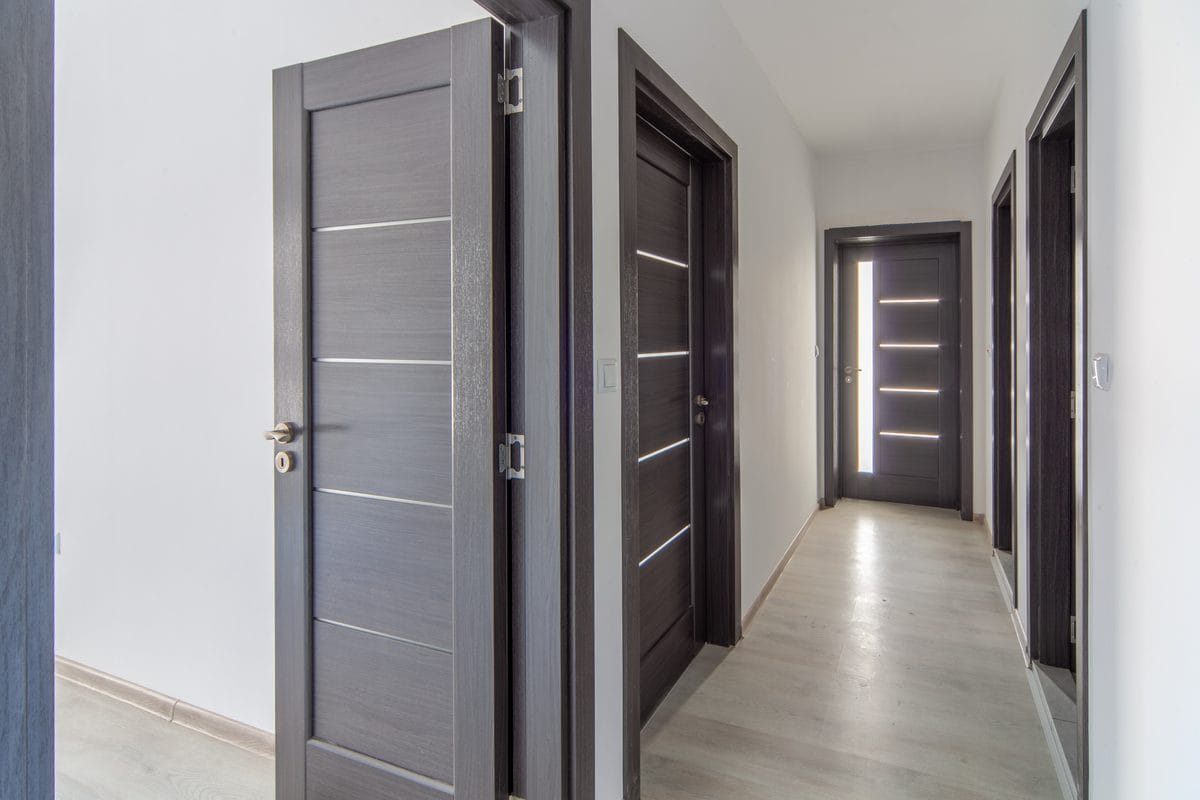
Can your panel go on a door? Only Joovv publishes door limits
No maker in this survey publishes what a door can carry. The default mount across this category is a hook that goes over the top of an interior door, and four makers describe it in their own words.
PlatinumLED, for the BIOMAX 900, a panel it lists at 33 pounds: "Hang the door hook on the top of any standard-sized door."
BonCharge, for the Super Max: "Hang the hook on any standard sized door as show below."
Mito Red Light's note is the one that speaks to the load: "Vinyl Straps can be doubled up for added hanging security." If you hang a Mito on a door, double the straps.
Joovv is the only brand that publishes real constraints, and they are all dimensional. Door thickness "thicker than 1-3/8'' up to 1 3/4''." Door height "taller than 84'' up to 96''," which requires buying an oversized kit. And a limit on quantity: "Do not install more than 2 systems on a single door frame."
So before you order a Joovv door mount, measure the door. Joovv's numbers run up to 1 3/4 inches thick and 96 inches tall, and a door taller than 84 inches needs the oversized kit. PlatinumLED and BonCharge say any standard door will do, for panels they list at up to 33 pounds.
Checkpoint: the mount. An Elite 3.0 goes on the Nano Wall System or the Mobile Stand. A Quad 3.0 or Max 3.0 can take Joovv's door mount if your door's thickness and height fall inside Joovv's numbers, though Joovv gives that mount no weight limit either. So the panel's own weight is your number: about 56 pounds for a Quad and about 42 for a Max.
Other makers' door hooks have no published limit of any kind, so plan around the heaviest weight the maker gives. Mito labels its figure as panel weight, 22 pounds for the MitoPRO 1500+.
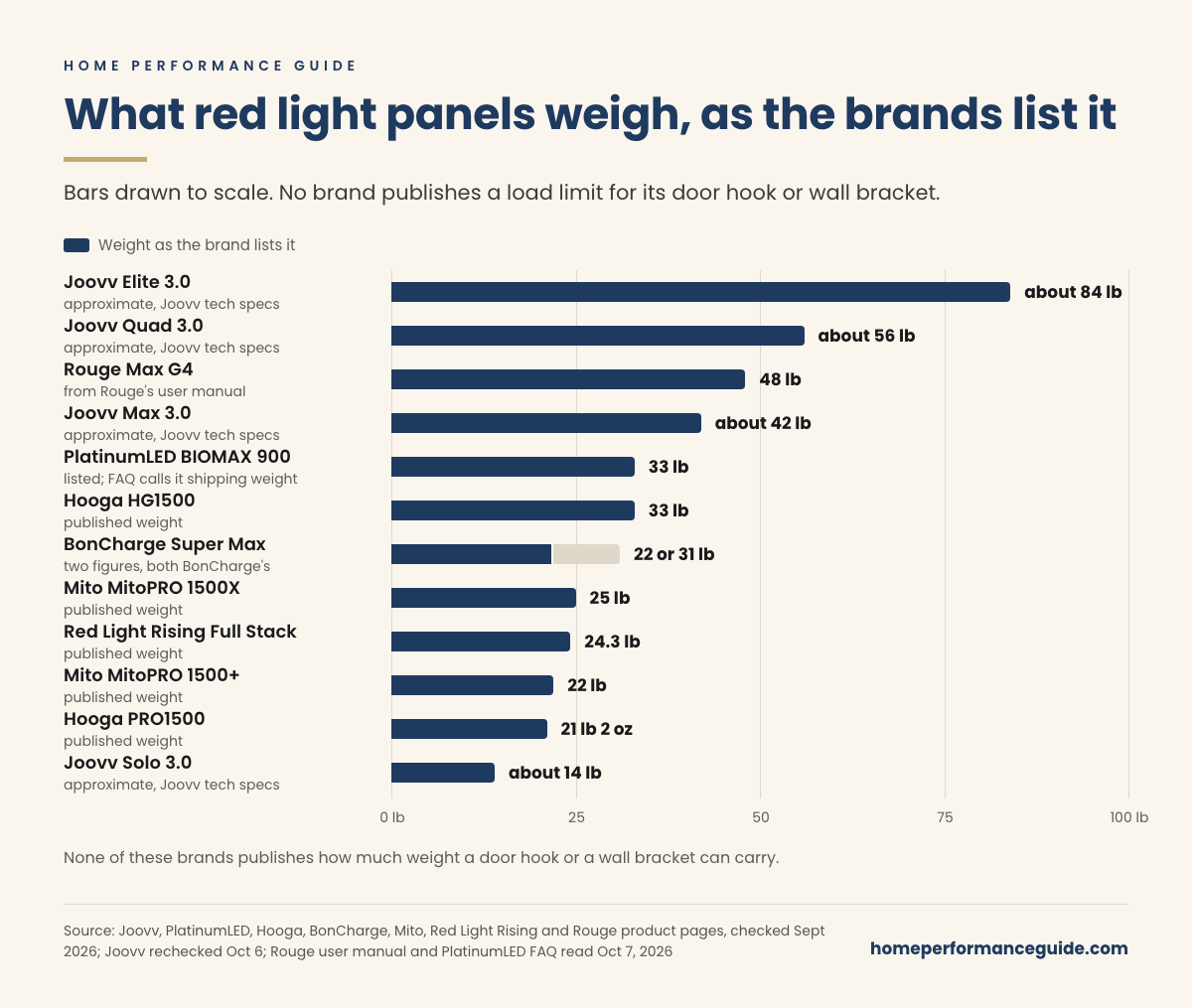
What these panels weigh, and what each number covers
Published weights run from about 14 pounds to about 84, and the figures may not measure the same thing from one row to the next.
Some are panel weights. Others are bare figures with no word on what they cover, and Joovv's Max, Quad and Elite rows are kits of several linked devices rather than single panels. The manufacturers are inconsistent about labeling which is which.
Where a maker publishes two conflicting figures, the table shows both, attributed. Where a maker publishes nothing, it says so rather than filling the gap from another source.
What this means for you: plan your hook or anchors around the largest figure your maker gives for your exact model, and ask what that figure includes before you buy the hardware.
Find your panel in the first column, then read the third column before you trust the second, because it tells you what that weight measures.
| Brand and model | Published weight | What that number is | Mount included |
|---|---|---|---|
| Joovv Elite 3.0 | ~84 lb | Approximate, from Joovv's tech specs | Your choice of Nano Wall System or Mobile Stand System (price varies by setup) |
| Joovv Quad 3.0 | ~56 lb | Approximate, from Joovv's tech specs | Your choice of Door Mount System, Nano Wall System or Mobile Stand System (price varies by setup) |
| Rouge Max G4 | 48 lb | From Rouge's G4 user manual; the product page gives none | Wall bracket per the manual; none listed on the product page |
| Joovv Max 3.0 | ~42 lb | Approximate, from Joovv's tech specs | Your choice of Door Mount System, Nano Wall System or Mobile Stand System (price varies by setup) |
| PlatinumLED BIOMAX 900 | 33 lb | Listed on the product page; the FAQ gives the same 33 lb as the boxed shipping weight | Door hook, brackets, screws |
| Hooga HG1500 | 33 lb | Published as weight | Hanging kit, door mount |
| BonCharge Super Max | 31 lb or 22 lb | Both figures are BonCharge's | Door mount, cables, pulley |
| Mito MitoPRO 1500X | 25 lb | Panel weight | Door hook, cables, straps |
| Red Light Rising Full Stack | 24.3 lb | Published as weight | Door kit, hanging pins |
| Mito MitoPRO 1500+ | 22 lb | Panel weight | Door hook, cables, straps |
| Hooga PRO1500 | 21 lb 2 oz | Published as weight | Hanging kit, door mount |
| Joovv Solo 3.0 | ~14 lb | Approximate, from Joovv's tech specs | Your choice of Boot Floor Stand, Door Mount System or Nano Wall System (price varies by setup) |
Two rows in that table, BonCharge's and Rouge's, need explaining, because each maker's own documents disagree.
BonCharge Super Max: which weight do you plan for?
Plan for the heavier one, 31 pounds, until BonCharge answers in writing.
The Super Max product page lists the weight as 14 kg, which it converts to 31 pounds. The Super Max user manual, published by the same company for the same product, lists it as 10 kg, converted to 22 pounds.
That's nine pounds apart, on the one number that decides whether a door hook is adequate.
The size doesn't line up either. The manual prints the panel's dimensions as "91cm x 21cm x 6.5cm (35.5 inches x 11.8 inches x 2.56 inches)." Twenty one centimeters is 8.27 inches by our arithmetic, not 11.8, and 11.8 inches is 30 centimeters, the width printed on the product page.
That suggests the manual carries the inch column from a 30 cm panel next to a 21 cm metric figure. Either way, neither document can be trusted for the panel's size, and the two can't both be right about its weight.
Confirm before you order: ask BonCharge in writing which weight is right for the Super Max, 14 kg or 10 kg, and whether the panel is 21 or 30 centimeters wide. With the answer in hand, you'll know the weight its door mount, cables and pulley have to carry. BonCharge still publishes no load rating for that mount and no wall draw, so ask questions 3 and 4 below as well.
If BonCharge won't answer, Mito's MitoPRO 1500+ avoids the weight question: Mito labels its 22 pounds as panel weight, and a door hook, cables and straps come with it. Like every door hook here, Mito's has no published load rating.
Rouge's documents disagree: is a wall bracket in the box?
Rouge's product page and its manual give different answers, so plan as if no bracket comes until Rouge confirms one.
The Rouge Max G4 is 71.65 inches long, the tallest single panel in this survey. Rouge's product page lists no weight, and the weight field in its store data is set to zero grams. Its G4 Series user manual, linked from that page, lists the Max G4 at 22.1 kg, or 48 pounds.
The product page lists a power cord, goggles and a remote in the box, and no mount. The manual's parts list says a wall bracket is "Included with Max G4, and Ultimate G4." Rouge also sells four stands that fit the Max G4, and the product page prices each panel and stand combination.
So for a six foot, 48 pound panel, Rouge's own documents disagree on whether a wall bracket is in the box, and neither says what that bracket can carry.
Confirm before you order: ask Rouge in writing whether a wall bracket ships with the Max G4, and what load it's rated for. If the bracket's rated load clears 48 pounds with real margin, the Max G4 is ready for a wall with a stud behind it. If Rouge won't confirm, order the Max G4 with one of those stands and skip the bracket.
What "1,500 watts" means for your circuit
On some panels, 1,500 watts is an LED rating rather than the draw at the wall, and the draw is the figure an electrician plans around.
Hooga publishes both numbers side by side for the HG1500. "Rated power: 1500W" and, separately, "Power consumption: 420W." A comparison chart on the same page gives the HG1500's power consumption as 585W.
Red Light Rising does the same for its Full Stack: 200 watts of real consumption against a 600 watt rating. Mito publishes a single honest draw figure, 375 watts for the MitoPRO 1500+ and 445 for the 1500X.
BonCharge publishes "Power 1,500W" for the Super Max and gives no actual draw figure on the page or anywhere in the manual.
Taken literally, 1,500 watts at 120 volts is 12.5 amps, by our arithmetic. The continuous load limit for a standard 15 amp branch circuit is 12 amps. Read at face value, BonCharge's number says you can't run this panel on an ordinary bedroom circuit.
Panels of nearly identical size and weight from other brands draw between 375 and 585 watts by their makers' figures. BonCharge's figure is almost certainly an LED array rating rather than wall draw, the same way Hooga labels its own. BonCharge never says so, though, so its own documents give you no way to know.
What this means for you: if the panel will share a circuit, get its wall draw in writing before you order. Mito prints one figure per panel, and Hooga prints the HG1500's consumption, though its page gives both 420W and 585W, so plan on 585. On a Super Max, that's the first thing to ask BonCharge.
If you're planning a room where a panel shares a circuit with anything else, the difference between 420 watts and 1,500 matters. Our guide to home sauna electrical requirements covers how to read these numbers against a breaker.
How much space does a panel need behind it?
None of the eight makers we read (BonCharge, Hooga, Joovv, Mito Red Light, PlatinumLED, Red Light Rising, Rouge and Therasage) publishes a required air gap between the back of the panel and the wall. Every panel here is actively fan cooled, and most are designed to sit flat against a door or a wall.
Mito is the only manufacturer that publishes any ventilation language at all. From its manual: "Do not block ventilation openings. Overheating and damage to the product may result." And: "DO NOT cover the cooling fans while operating the light."
Mito also publishes a limit worth knowing if you plan to run two panels: "Do not connect more than two (2) panels (MitoPRO 1500+ or smaller) together with the same power cord."
Joovv publishes siting rules rather than clearances. "Do not install system near heated surfaces such as nearby fireplaces or ceramic heaters." And one that matters if the panel is headed for a room with a sauna: "Do not install or store system in humid or wet locations such as a sauna or wet sauna."
So leave a gap behind a fan cooled panel even though nobody specifies one. The fans are there for a reason, and the makers haven't told you what they need. If yours is a Joovv, its own rules also take humid or wet spots such as a sauna, and the spot by a fireplace or ceramic heater, off the list.
Which code covers red light panel mounting?
No code sets a requirement for hanging a panel, so your wall and your anchor decide it.
The International Residential Code, Chapter 6, governs wall construction: stud size, spacing, sheathing, the fastener schedule for building the wall itself. It has nothing to say about attaching an object to a finished wall and contains no load table for anchoring into drywall. It doesn't apply here.
The standard that does apply is UL 2442, which covers wall and ceiling mounts and requires a mount to be marked with a rated load. Two things about it. It is voluntary, and it applies to whoever manufactures the mount, not to you. No red light brand in this survey claims UL 2442 listing for its bracket or door hook, and none publishes a rated load.
So if you're hanging a 33 pound panel, or a heavier one, you have no code obligation to satisfy and no maker's load rating to rely on. The one enforceable number in the whole purchase is printed on the packaging of the anchor you buy at the hardware store, so that's the number to plan around.
What to do instead: plan the mount yourself
You can plan the mount from what you can confirm yourself, in five moves.
- Find out what your weight figure measures. If the maker doesn't say what the number covers, you don't yet know what you're hanging. Email and ask: the answer takes one message and changes your hardware.
- Find a stud for anything that hangs on the wall. No maker here requires it, and that silence is a failure of their documentation rather than evidence that drywall alone is fine.
- Read the anchor's own box. Toggle bolts and heavy duty anchors publish rated shear and pullout values in half inch drywall. Choose one with real margin over the heaviest weight your maker gives.
- Measure your room depth before you buy. Published distances run from 3 inches to 18 depending on the brand, and you need that distance, plus room for your body and a spot to stand. A panel that fits the wall doesn't automatically fit the room.
- Price the floor stand before you rule it out. A stand can add real cost, but it removes the wall question entirely.
If you're putting a panel in the same room as a plunge or a sauna, the load and clearance questions compound. Our guide to cold plunge floor loading covers the floor side of the same problem, including why a concentrated load and a code live load are not the same comparison.
Which red light panel to get for your mount
On a door, get a Joovv Max 3.0 or Quad 3.0 on Joovv's door mount, the only door setup here with published limits on door size. On a wall or stand, Joovv's Elite 3.0 takes the Nano Wall System or Mobile Stand, and Rouge's Max G4 goes on one of its four stands until Rouge confirms the bracket in writing.
For a door hook from any other maker, the MitoPRO 1500+ is the one to get. Mito's are the only weights in the table labeled as panel weight, 22 pounds for the 1500+, and Mito prints its wall draw, 375 watts. If you're also weighing a Vellgus, Vellgus vs Mito Red Light sets the two makers' 36-inch panels side by side.
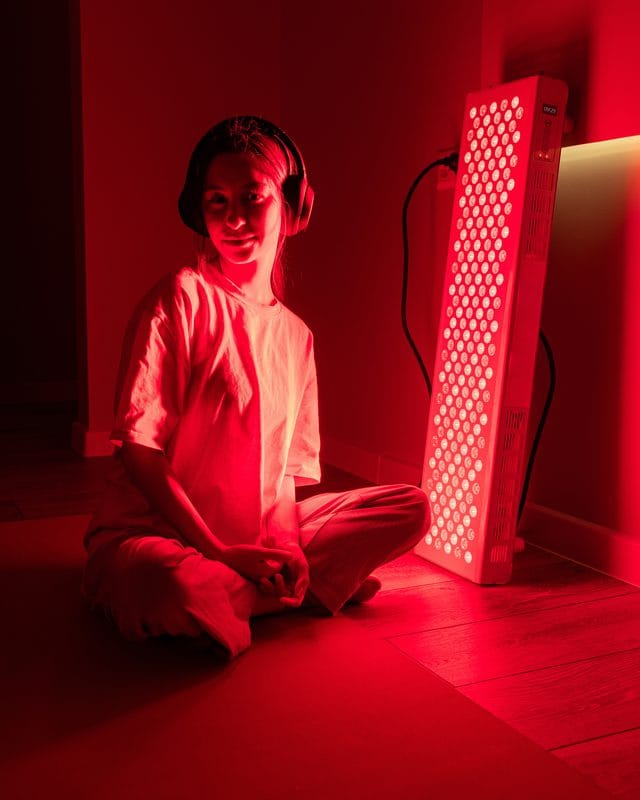
On a gray February morning, the panel is already up in the spare room. It hangs on its bracket, screwed into the stud you marked, with the cord run along the baseboard to the outlet. You step onto the strip of tape where you stand and switch the panel on.
Whoever you buy from, send these questions before you order. A company that answers the first three in one email is telling you something useful about the rest of its documentation.
- What does the panel alone weigh, and what does your published weight include?
- What mounting hardware ships in the box?
- What is the actual wall draw in watts, as distinct from the LED rating?
- What weight is your door mount or wall bracket rated to carry?
- How much clearance do the cooling fans need behind the panel?
- For BonCharge: is the Super Max 14 kg or 10 kg, and 21 or 30 centimeters wide?
- For Rouge: does a wall bracket ship with the Max G4, and what load is it rated for?
If you're weighing a Vellgus panel, read our Vellgus review first: it covers what Vellgus's own pages say about size, power, FDA status and returns. Vellgus wasn't one of the eight makers we read for this guide, so nothing above is a finding about its mounting documents. Send Vellgus the same questions, then order it on the mount that fits your wall.
See the panels at Vellgus Red Light
We earn a commission on Vellgus purchases made through our links.
Before you order
- Settle the mount at the Checkpoint above, and measure your door's thickness and height if it's a Joovv door mount.
- Send the maker the questions above, and get the weight and what it includes in writing.
- Mark the studs where the panel will hang, or choose the stand.
- Buy anchors whose rated shear and pullout values give you real margin over the heaviest weight your maker gives.
- Tape out the floor: the maker's distance from the panel, then room for your body and a spot to stand.
- If the panel shares a circuit, take its wall draw and a list of everything else on that circuit to your electrician.
- Then order on the mount you chose: Joovv's door mount for a Max 3.0 or Quad 3.0 whose door passed step 1, the Mobile Stand or Nano Wall System for an Elite 3.0, or a Rouge stand for a Max G4. For a Vellgus, get its written answers first.
Common questions
How much does a red light therapy panel weigh?
It depends on the panel, and the published figures may not all measure the same thing. PlatinumLED publishes 33 pounds for the BIOMAX 900 and Hooga publishes 33 pounds for the HG1500. Mito publishes 22 and 25 pounds for its MitoPRO 1500+ and 1500X. Joovv's tech specs list weights of about 14, 42, 56 and 84 pounds for the Solo, Max, Quad and Elite 3.0, without saying whether a mount or stand is included. BonCharge publishes two different weights for the same panel. Rouge's product page gives no weight, while its user manual lists the Max G4 at 48 pounds.
Can you hang a red light panel on a door?
Most full body panels ship with a door hook, and manufacturers say you can. What none of them publish is a weight limit in pounds. PlatinumLED says to hang a 33 pound panel on any standard sized door. BonCharge says the same. Joovv is the only brand publishing real constraints, and they are dimensional: door thickness thicker than 1-3/8 inches up to 1 3/4 inches, height taller than 84 inches up to 96 inches, and no more than two systems on a single door frame. No pounds figure from anyone.
Does a red light panel need a dedicated circuit?
Probably not, but the published wattage figures make it hard to tell. LED rating and actual wall draw are different numbers. Hooga publishes both for the HG1500: rated power of 1500 watts and power consumption of 420 watts, though a chart on the same page gives 585. Red Light Rising publishes 600 watts rated against 200 watts real. Mito publishes single honest draw figures of 375 and 445 watts. BonCharge publishes 1,500 watts for the Super Max with no consumption figure anywhere, which taken literally would be 12.5 amps at 120 volts, above the 12 amp continuous limit for a 15 amp circuit.
Is there a building code for mounting a red light panel to a wall?
No. The International Residential Code, Chapter 6, governs how walls are built rather than what you attach to a finished wall, and contains no load table for anchoring into drywall. UL 2442 covers wall and ceiling mounts and requires a mount to be marked with a rated load, but it is voluntary and applies to the mount's manufacturer. No red light brand in this survey claims UL 2442 listing or publishes a rated load. The only load number available to a homeowner is printed on the packaging of the anchor they buy.
Your next step
Tonight, run a stud finder along the wall where the panel would go, then tape out the floor in front of it where you'd stand. With those two marks down, you'll know which mount to order.
The free Room Planner was written for sauna and cold plunge rooms, but its room and electrical measurements apply here too.
Get the free Home Performance Room Planner
We read the makers' own documents, checked in September 2026 with rechecks through October 7, and did not test these panels. This is general information, not electrical, structural, code or medical advice, and no claim about red light's effects; confirm with the maker, your building authority and a contractor. Home Performance Guide earns a commission on our Vellgus links, at no extra cost to you. Other makers' links earn us nothing (affiliate disclosure, editorial standards).
Get the Room Planner.
Thirteen measurements to take before you buy sauna or recovery equipment, with the manufacturer specs and code references behind each one. Free. Planning a golf simulator instead? There is a twelve-measurement golf planner too.
ABOUT
Verified buyer guides for home sauna, cold plunge and recovery equipment. Specs from the manufacturers, not from other blogs.